> ## Documentation Index
> Fetch the complete documentation index at: https://promptlayer-1023-gorgias-docs.mintlify.site/llms.txt
> Use this file to discover all available pages before exploring further.
# JavaScript
To get started, create an account by clicking “*Log in*” on [PromptLayer](https://promptlayer.com/). Once logged in, click the button to create an API key and save this in a secure location ([Guide to Using Env Vars](https://nodejs.dev/en/learn/how-to-read-environment-variables-from-nodejs/)).
Once you have that all set up, install PromptLayer using `npm`.
```bash
npm install promptlayer
```
## OpenAI
In the JavaScript file where the OpenAI APIs are integrated, include the following lines. They enable PromptLayer to track your requests without additional code modifications.
```js
import { promptlayer } from "promptlayer";
const OpenAI = promptlayer.OpenAI;
const openai = new OpenAI();
```
**You can then use `openai` as you would if you had imported it directly.**
Your OpenAI API Key is **never** sent to our servers. All OpenAI requests are
made locally from your machine, PromptLayer just logs the request.
### Adding PromptLayer tags: `pl_tags`
PromptLayer allows you to add tags through the `pl_tags` argument. This allows you to track and group requests in the dashboard.
**Tags are not required but we recommend them!**
```js
openai.chat.completions.create({
messages: [{ role: "user", content: "Say this is a test" }],
model: "gpt-3.5-turbo",
pl_tags: ["test"],
});
```
### Returning request id: `return_pl_id`
PromptLayer provides an option to retrieve the request id using the `return_pl_id` argument. When set to true, it returns a tuple where the second element is the request id.
```js
openai.chat.completions.create({
messages: [{ role: "user", content: "Say this is a test" }],
model: "gpt-3.5-turbo",
return_pl_id: true,
});
```
### TypeScript
The PromptLayer JavaScript library also supports TypeScript. You can type cast the `OpenAI` class to `typeof BaseOpenAI` to get the correct typings.
```ts
import BaseOpenAI from "openai";
import { promptlayer } from "promptlayer";
const OpenAI: typeof BaseOpenAI = promptlayer.OpenAI;
const openai = new OpenAI();
```
You can also use our custom attributes `pl_tags` and `return_pl_id` with TypeScript. You will need to add the `@ts-ignore` comment to ignore the TypeScript error.
```ts
openai.chat.completions.create({
messages: [{ role: "user", content: "Say this is a test" }],
model: "gpt-3.5-turbo",
// @ts-ignore
return_pl_id: true,
});
```
This is because the `pl_tags` and `return_pl_id` arguments are not part of the OpenAI API.
## Anthropic
Using Anthropic with PromptLayer is very similar to how to one would use OpenAI.
Below is an example code snippet of the one line replacement:
```js
import { promptlayer } from "promptlayer";
// Instead of `import Anthropic from "@anthropic-ai/sdk";` ->
const Anthropic = promptlayer.Anthropic;
const anthropic = new Anthropic();
promptlayer.api_key = process.env.PROMPTLAYER_API_KEY;
const response = anthropic.completions.create({
prompt: `${Anthropic.HUMAN_PROMPT} How many toes do dogs have? more information more information more${Anthropic.AI_PROMPT}`,
stop_sequences: [Anthropic.HUMAN_PROMPT],
model: "claude-v1-100k",
max_tokens_to_sample: 100,
pl_tags: ["test-anthropic-1"],
return_pl_id: true,
});
console.log(response);
```
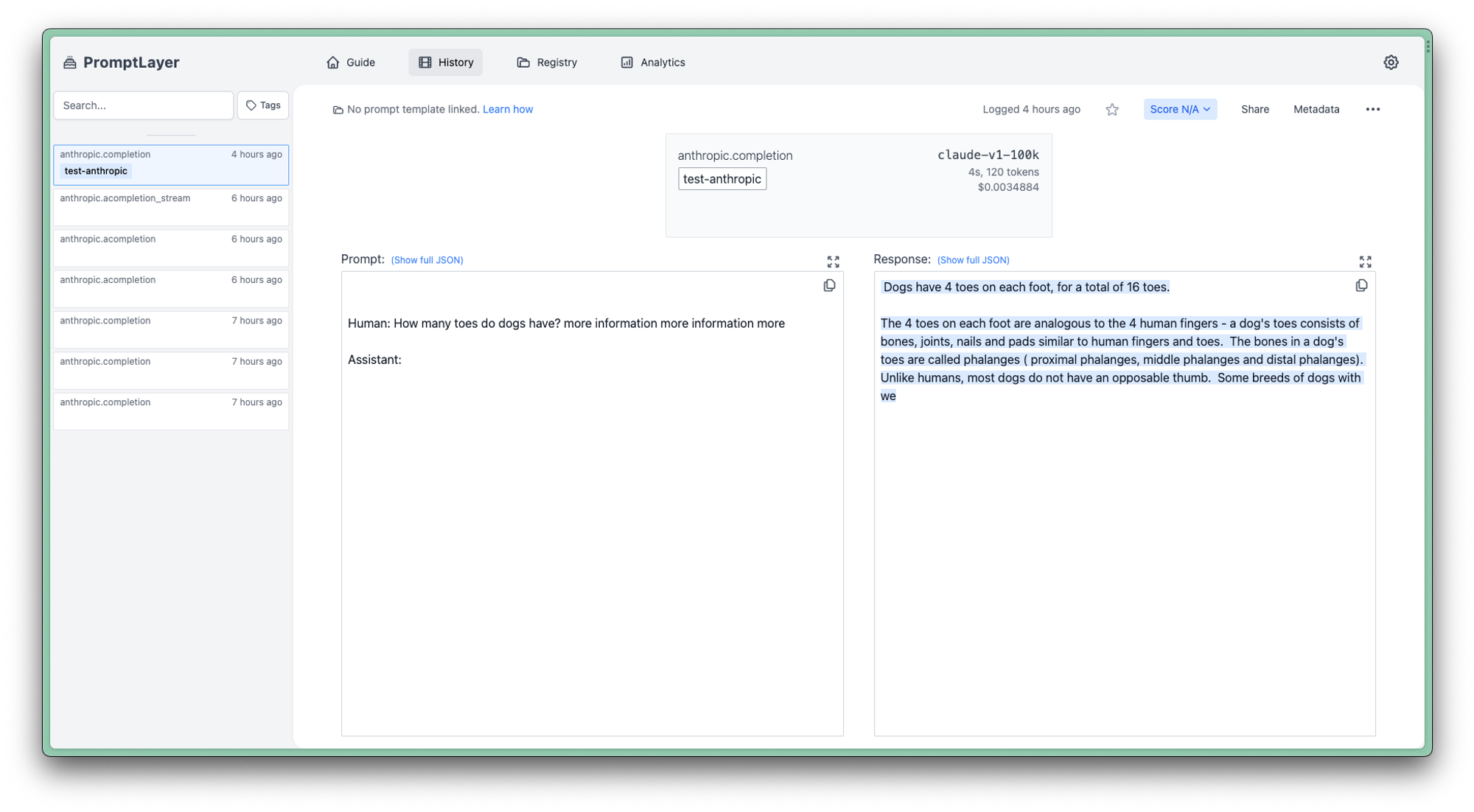
Here is how it would look like on the dashbaord:
 ***
Want to say hi 👋 , submit a feature request, or report a bug? [✉️ Contact us](mailto:hello@promptlayer.com)
***
Want to say hi 👋 , submit a feature request, or report a bug? [✉️ Contact us](mailto:hello@promptlayer.com)