Introduction
Have you ever spent way too long browsing recipes trying to find one that actually sounds good to you? We’ve all been there - endlessly scrolling through lists of recipes, hoping to stumble upon one that matches our personal tastes. Unfortunately, most recipe sites take a one-size-fits-all approach, showing the same recipes to everyone without tailoring recommendations to individual preferences. This can make the process of finding a recipe you’re excited to cook feel like finding a needle in a haystack. The recipe recommendation engine described in this guide aims to solve these problems. By learning about each user’s unique tastes, it can suggest recipes that are specifically tailored for that individual. No more wasting time manually searching through irrelevant recipes. This guide will walk through how to build an intelligent system that takes the effort out of recipe selection by providing personalized recommendations. With the right recommendation engine, discovering your next culinary masterpiece is merely a request away.Key Concepts
To enable personalized recipe recommendations, we will utilize two key technologies:- Vector Database: A vector is an array or list of numerical values that represents a point in multi-dimensional space. Recipes and ingredients can be represented as vectors to capture their attributes. A vector database stores these vectors and enables quick searches for recipes that align with a user’s preferences, based on vector similarity.
- Retrieval-Augmented Generation (RAG): This is a method that first fetches relevant data from a large database and then uses a language model to craft suitable responses or recommendations. For our recipe engine, RAG helps find the best recipes for a user and then presents tailored suggestions.
Building Blocks
Creating a personalized recipe recommendation engine requires assembling the right combination of technologies to enable understanding user tastes, searching recipes effectively, and generating creative suggestions. We will leverage three key building blocks that each provide the necessary capabilities:- OpenAI: Used for generating vector representations (also referred to as “embeddings”) of recipe texts. Additionally, OpenAI is used to craft the final recipe suggestion for the user based on a list of recipes that match the user’s query.
- Pinecone: A vector database service that efficiently stores these embeddings.
- PromptLayer: A platform that enables collaborative prompt engineering by allowing teams and individuals to systematically track, debug, and optimize prompts for language models.
Setting Up the Environment
To get started, visit the GitHub repo for this project and download the data files. Each one contains a recipe that we will use throughout the project. Next, we need to set up the API keys for the services we will be using.OpenAI setup
- Create an API key at https://platform.openai.com/account/api-keys
- Save it as an environment variable under
OPENAI_API_KEY
Pinecone setup
- Create an API key at https://app.pinecone.io/
- Save it as an environment variable under
PINECONE_API_KEY
PromptLayer setup
- Create an API key at https://promptlayer.com/home
- Save it as an environment variable under
PROMPTLAYER_API_KEY
Generating Recipe Embeddings
With our environment set up, our first task is to generate embeddings (vector representations) for each recipe using OpenAI’s embedding API. But before diving into that, there are a few preparatory steps to handle. Let’s start by first pulling in the necessary libraries and initializing OpenAI through PromptLayer. This setup ensures that every OpenAI request we make is automatically logged by PromptLayer.Querying Pinecone
The recommendation logic will operate by initially converting a food item the user is interested in into a vector. For the time being, to get things up and running, we can simply hardcode the value “chicken”.Creating a Prompt Template
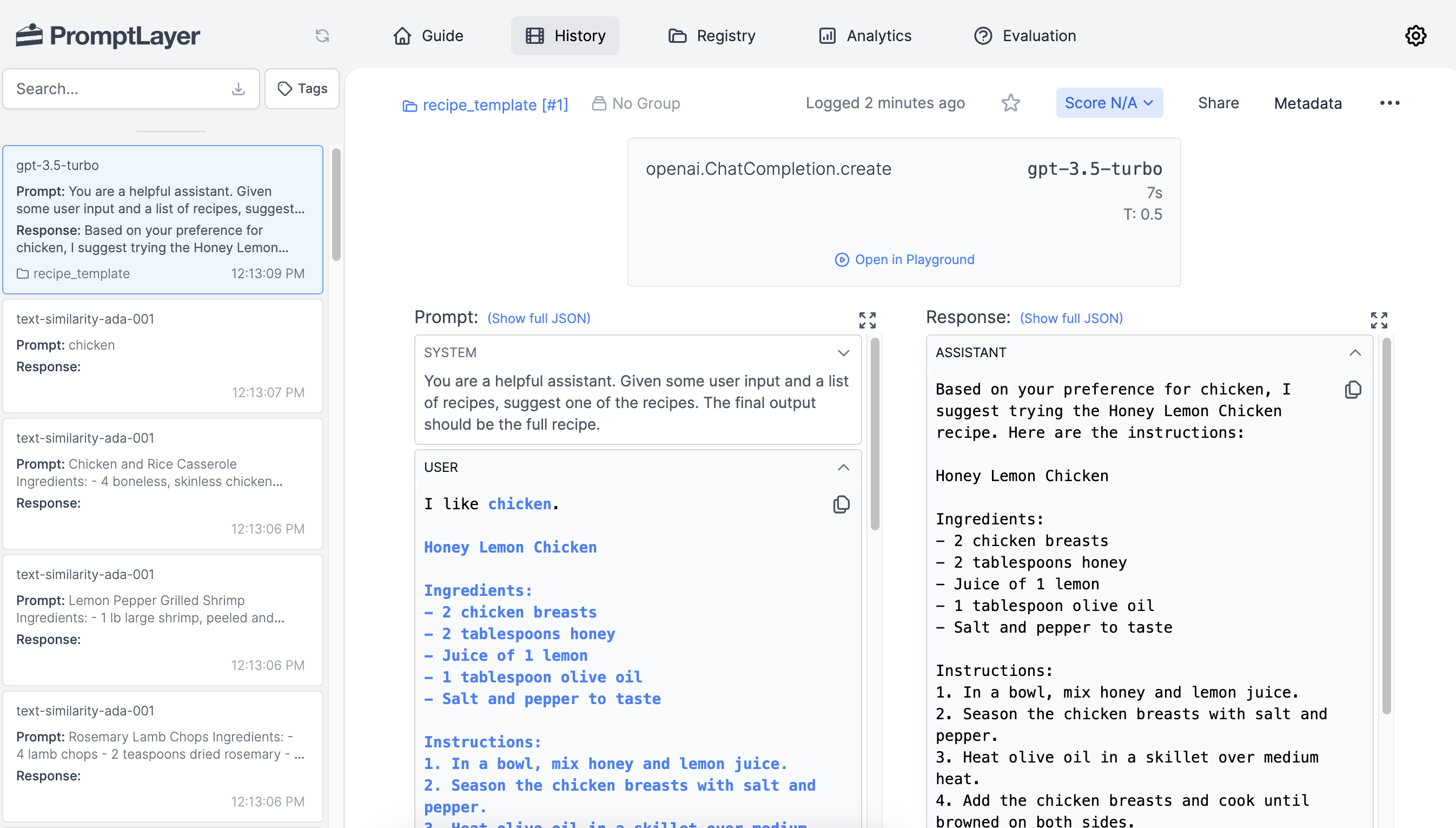
The final goal of this project is to obtain a single recipe to recommend to the user. To accomplish this, we will first create a prompt template using PromptLayer. A prompt template is a customizable prompt string with placeholders for variables. When it comes to crafting prompts, prompt templates provide many benefits including reusability, built-in versioning, enhanced collaboration, and much more. The Prompt Registry is where we can easily manage all of our prompt templates. The video below will show you how to create a prompt template via the Prompt Registry. We will structure our template to accept two variables, one for the users food preference and the other for the recipes. Once our prompt template has been created, we can retrieve it from PromptLayer.variables dictionary containing the values we want to pass in. Using these values, we’ll construct the full prompt then pass it to OpenAI to obtain a recipe suggestion.
Improving Results with Prompt Engineering
Things are working, but let’s tweak our prompt a bit to see if we can get some better results. Instead ofI like {food}, try using the text My favorite food is {food}.
This simple change in the phrasing of the prompt can significantly alter the response from the AI. Using more affirmative language like “My favorite food is” rather than just “I like” puts more emphasis on the user’s preference. This signals to the AI that it should pay close attention to tailoring the suggestion to that specific food.
Prompt engineering involves systematically experimenting with different ways of phrasing the input prompt to find what works best. Some key aspects to tweak can include:
- Using more natural conversational language
- Providing additional context to guide the AI
- Emphasizing key information through wording
- Adjusting the tone, perspective, and personality
Scoring Requests
PromptLayer also provides the ability to score the responses generated from each request. This allows tracking how well different prompt variations are performing over time. After making a request, you can assign it an integer score from 0 to 100 based on the quality of the response, where 100 is the best possible response and 0 is the worst. By scoring the results of recipe recommendations, developers can measure the effectiveness of the prompts and the relevance of returned recipes. Higher scores can indicate that the recipes are closely aligned with user preferences, while lower scores can highlight the need for prompt optimization. There are two ways to add scores to requests in PromptLayer: Via the Dashboard In the PromptLayer dashboard, you can view the log of all requests made. Here we will manually update the score field with a value ranging from 0 to 100 based on our assessment of the response quality. Programmatically You can also add scoring programmatically by calling thescore() method after making a request:
Setting Template Parameters
When editing a template, you can click on “Parameters” > “Set Parameters” to set values such as provider, model, and temperature on your prompt template.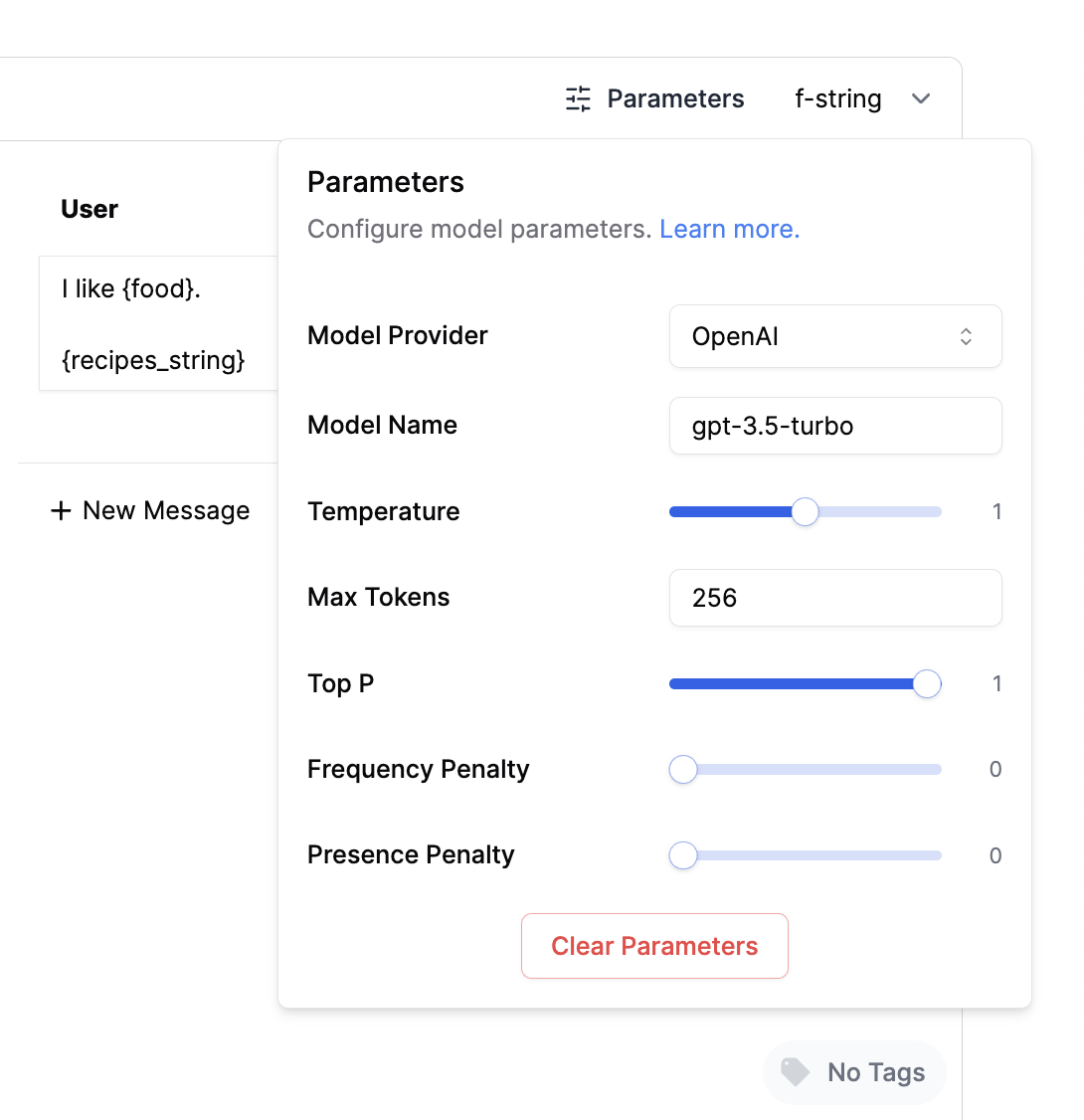 You can now retrieve that metadata by using the following code:
Adding Labels
To help organize and find prompt templates, we can add labels to them. Let’s tag our latest template with a “prod” label to show that it is ready to use in production.Tracking Metadata
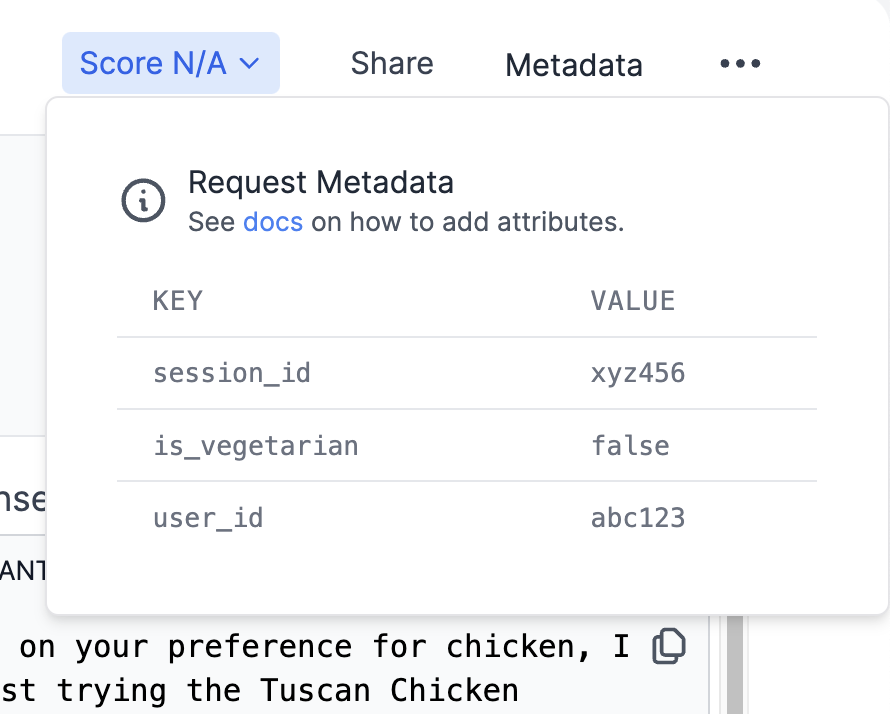
In addition to scoring, PromptLayer allows you to attach arbitrary metadata to each request. This metadata can be used to tag requests with contextual information like user IDs, session IDs, error codes, etc. Metadata is helpful for advanced analysis and debugging of your prompt performance. You can quickly lookup requests associated with a specific user or error case. The analytics tab also allows for filtering and segmentation based on metadata values. Metadata can also provide additional context for each recommendation request, making it easier to debug issues or anomalies. For instance, if certain users consistently receive low-scoring recommendations, the associated metadata can help identify potential causes. By attaching user-specific metadata (e.g., user ID, dietary preferences, geographical region), the system can further tailor recommendations to individual users, enhancing the personalization of recipe suggestions. To add metadata to a request, use themetadata() method: